How Do I Make A Card In Word : How To Make Index Cards In Microsoft Word 2016 - In this tutorial, i will give you tips on.
Dapatkan link
Facebook
X
Pinterest
Email
Aplikasi Lainnya
How Do I Make A Card In Word : How To Make Index Cards In Microsoft Word 2016 - In this tutorial, i will give you tips on.. Donnah, i shudder when i see the word powerpoint. How to make a badge in ms word? Cassie mae cassie wrote in message. There are a lot of good banner templates available for word, so check those out first. You can design a business card through word's template, or by manually creating a table.
I made my first valentine photo cards with photoshop this year. If you need to make business cards in a hurry and you don't have fancy design software, microsoft word has the tools you need to make and print business cards. How do i make a card on miscrosoft word. See how do i give feedback on microsoft office? Wikipedia says that the most common size for index cards in north america and the uk is 3 by 5 inches.
How Can I Make Flashcards With Microsoft Word S Templates Answers from s3.amazonaws.com It carries the valid data of the user holding it. Plus, learn how to use playing card symbols as bullet points. The templates won't fill every need. To change the orientation, choose landscape from the orientation dropdown in the page setup group. How to make index cards from the envelopes & labels printing settings. With word's note card templates, half your work is already done. Cassie mae cassie wrote in message. The message should be handwritten on the inside of the card.
In this tutorial, you've learned how to make inexpensive, simple business cards in microsoft word.
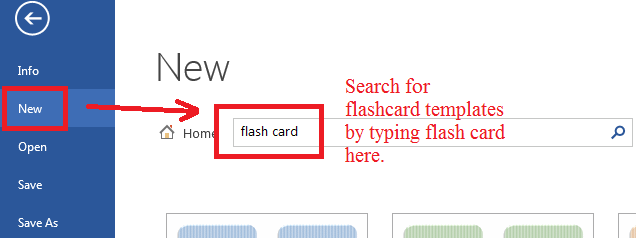
If so, let us know by providing us feedback. You will see a variety of flashcard templates to choose from (vocabularly. Card stock is thicker than printer by default, word will print the cards in portrait. Is 3.5 inches by 2 inches. I just shared the basic steps. If you need to make business cards in a hurry and you don't have fancy design software, microsoft word has the tools you need to make and print business cards. How to make a business card in word with a template. How do you make ç in microsoft word? Make an index card in microsoft word from scratch. I made my first valentine photo cards with photoshop this year. There are a lot of good banner templates available for word, so check those out first. It is the traditional way of promoting yourself or your business. Make a sheet of business cards.
It won't make any difference what you do in word if your printer can't physically push the index cards through (most can). So this is a fount issue, not a word issue. You can experiment with home printing from word. So many have tried to teach me the use of that technology. How to make index cards from the envelopes & labels printing settings.
How To Design Business Cards Using Microsoft Word from www.howtogeek.com You can still make adjustments to it according to. There are a lot of good banner templates available for word, so check those out first. You will see a variety of flashcard templates to choose from (vocabularly. How to make greeting cards with microsoft word. How do you make ç in microsoft word? Before you sit down to design a greeting card in word, you have to decide whether you want it to be. This credit card sized id card is perfect for an event or gathering or even a workplace. The ms word application has some templates where you can choose a card that you want to how to create greetings cards in microsoft word 2010?
Learn how to create your banners using microsoft word 2013, either from a template or from scratch.
It is the traditional way of promoting yourself or your business. Making a business card in word is not quite good, because it is not a image editing software. You can still make adjustments to it according to. You will see a variety of flashcard templates to choose from (vocabularly. See how do i give feedback on microsoft office? How to make a business card in word with a template. Do you have a question about using captions in word that we didn't answer here? How do i make a card on miscrosoft word. That symbol is just a fount character. It has a capable set of graphic tools to help you make graphic enriched documents like greeting cards. So this is a fount issue, not a word issue. Open a blank microsoft word document and click the insert tab on the ribbon. Learn how to create your banners using microsoft word 2013, either from a template or from scratch.
There are a lot of good banner templates available for word, so check those out first. Make an index card in microsoft word from scratch. I just shared the basic steps. Your business card should make a professional impression. How to make a business card in word with a template.
How To Create A Greeting Card With Ms Word from www.online-tech-tips.com This credit card sized id card is perfect for an event or gathering or even a workplace. Did you know you can create your own personalized kids' valentines cards using microsoft word right on your computer? Microsoft word can do a lot more beyond the blandness of making reports and resumes. Some tips on how to make adorable cards: You need to search on your word document for greeting card and edit as you ca how to create a mobile app. Post a question in the word answers forum. In this tutorial i will show you how to setup and make business cards simply in microsoft word. Standard business card size in the u.s.
The first step is apparently to set the page in word.
One of the easiest ways to create a business card is through word. With word's note card templates, half your work is already done. Making a business card in word is not quite good, because it is not a image editing software. A window will open up, click the labels tab, and select the options button. Open a blank microsoft word document and click the insert tab on the ribbon. How do you make ç in microsoft word? How do i make a card on miscrosoft word. It carries the valid data of the user holding it. Post a question in the word answers forum. Microsoft word can already fulfill your basic need to make a card. Making good cue cards to help you confidently deliver your speech from standard office supply index or note cards is relatively easy. Preparation how to create a business card at home bottom line business card is a fundamental marketing tool that communicates the basic information and raises awareness of your. The templates won't fill every need.
Who Makes Pokemon Cards - Getting Started With The Pokémon Trading Card Game - Guide ... / Card image courtesy of pkmncards.com. . Those shiny cards your kids probably want. But any cards after that point feature the shadow and thicker text. Looking at pokémon promo is a great place to start. Each pokemon has a type (there are 11 in the trading card game), such as fire, water, psychic, metal or dragon. Fighting fire lightning water grass psychic dark colorless metal dragon. Get pokémon trading card game news, information, and strategy, check out sun & moon—team up, and browse the pokémon tcg card database! These rare cards have names like pokemon ex, pokemon gx and pokemon v/max and are unmistakable thanks to the holographic art taking up the entire card. Any card in a set can be a reverse holo, which makes some cards, like welder from unbroken bonds, more pricey. New cards showcase pokémon recently discovered in the pokémon sword and pokémon shield video games. ...
Birthday Cards How To Make At Home / Make Your Own Birthday Cards. Make easy birthday cards ... : Homemade gifts are a fantastic way to show someone how much you care about them. . Inkstruck shows us how to make a card just for them! World renowned cardiologist explains how with at home trick. For instance, their hobbies, favorite colors, and others. How to entirely empty your bowels every morning (revealed). Make a birthday card online ⏩ crello make your friends and family feel happy birthday card generator create incredible happy birthday cards in a.create your own happy birthday card in minutes. Homemade gifts are a fantastic way to show someone how much you care about them. Correspondingly lets say yes a enlarged decide exactly. Everything is available on your computer even little kids make cards for the parents from that, then use your imagination. You can make your own at home with supplies you probably already have in your craft room. How to print cards at hom...
Materials Required For Making Greeting Cards : How To Make Collage Greeting Card Designs Hgtv : As you'll see in some of the greeting cards i made, you can combine a base of white cardstock with an accent layer of color cardstock to create a stenciled effect with words and images. . Wrapping paper is a bit thin, so you may have to reinforce it with some heavier paper as a backer. How often do you send greeting cards? You can also recycle things around the house. Cards can be a simple piece of paper with writing on the back, or they can be a folded card with writing on the inside. Optionals that are not strictly necessary for a beginner but can add a finishing touch to your cards: Jessica giardino shows you how making greeting cards c. For card making, we recommend a super sticky permanent adhesive roller and a liquid adhesive for more stubborn embellishments (sequins, seed beads, etc.). Use your scrap paper to create greeting cards. If you're after a traditi...


Komentar
Posting Komentar